
Trong các bài học về bộ nhớ trước đây (Bài 7 & 8), chúng ta đã học cách giúp Agent ghi nhớ nội dung chat trong một phiên làm việc. Tuy nhiên, nếu người dùng quay lại sau một tuần với một thread_id mới, Agent sẽ hoàn toàn quên họ là ai. Bài học này sẽ hướng dẫn bạn sử dụng Store để xây dựng "Trí nhớ vĩnh viễn", tích hợp vào hệ thống tiện ích và quản lý môi trường chuyên nghiệp từ Bài 1.
I. Store khác gì với Checkpointer?
Để xây dựng Agent cấp độ doanh nghiệp, bạn cần phân biệt rõ hai tầng lưu trữ:
| Đặc điểm | Checkpointer (Short-term) | Store (Long-term) |
|---|---|---|
| Phạm vi | Chỉ trong một Thread cụ thể. | Xuyên suốt mọi Thread của cùng một User. |
| Dữ liệu lưu | Toàn bộ lịch sử tin nhắn thô. | Các "sự thật" đã được chọn lọc (sở thích, thói quen). |
| Khi nào mất? | Khi thay đổi thread_id. | Không bao giờ mất (trừ khi chủ động xóa). |
II. Cấu trúc Namespace và Key trong Store
Store hoạt động giống như một hệ thống quản lý tệp tin:
- Namespace (Không gian tên): Giống như các thư mục để phân loại dữ liệu (ví dụ:
["users", userId, "preferences"]). - Key (Khóa): Tên định danh cho mẩu thông tin (ví dụ:
"dietary_restrictions"). - Value: Dữ liệu thực tế, luôn được lưu dưới dạng đối tượng JSON.
III. Mã nguồn: 17-long-term-memory-store.ts
Chúng ta sẽ mô phỏng một kịch bản: Người dùng giới thiệu sở thích ở Thread A, sau đó quay lại ở Thread B (mới hoàn toàn). Agent sẽ tự động tra cứu "sổ tay" vĩnh viễn để đưa ra tư vấn cá nhân hóa.
// apps/langchain/scripts/17-long-term-memory-store.ts
// pnpm --filter=ai-notes-langchain run tsx scripts/17-long-term-memory-store.ts

import './env';
import { createGeminiModel, generateImage } from '@workspace/util-langchain';
import { createAgent, tool, type ToolRuntime } from 'langchain';
import { InMemoryStore, MemorySaver } from '@langchain/langgraph';
import { z } from 'zod';

// 1. Initialize Long-term Store and Short-term Checkpointer
const store = new InMemoryStore();
const checkpointer = new MemorySaver();

// 2. Tool for the AI to "write" into its long-term notebook
const savePreference = tool(
  async ({ key, value }, runtime: ToolRuntime) => {
    const userId = runtime.context?.userId;
    if (!userId) return 'Error: User ID not found in context.';

    // Save to Store: Namespace = ["users", userId], Key = key
    await runtime.store?.put(['users', userId], key, { content: value });

    return `Successfully saved preference "${key}" as "${value}" for user ${userId}.`;
  },
  {
    name: 'save_user_preference',
    description:
      'Use this tool to persist important user facts, habits, or special requests.',
    schema: z.object({
      key: z.string().describe("The preference key (e.g., 'favorite_food')"),
      value: z.string().describe('The content of the preference'),
    }),
  },
);

// 3. Tool for the AI to "read" from its long-term notebook
const getPreferences = tool(
  async (_, runtime: ToolRuntime) => {
    const userId = runtime.context?.userId;
    if (!userId) return 'I dont know who you are yet.';

    // Search for all entries in the user's namespace
    const items = await runtime.store?.search(['users', userId]);

    if (!items || items.length === 0)
      return 'I have no long-term memories of you.';

    const info = items.map((i) => `- ${i.key}: ${i.value.content}`).join('\n');
    return `Here is what I remember about you:\n${info}`;
  },
  {
    name: 'get_user_preferences',
    description:
      'Use this tool to look up what you already know about the user from past sessions.',
    schema: z.object({}),
  },
);

async function main() {
  const model = createGeminiModel({
    model: 'gemini-2.5-flash',
    keyName: 'GEMINI_API_KEY_04',
  });

  const agent = createAgent({
    model,
    tools: [savePreference, getPreferences],
    store, // Attach the long-term store
    checkpointer,
  });

  // Generate visual diagram
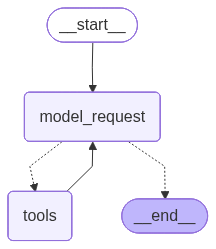
  await generateImage(agent.graph, 'graph-ignore/scripts-17-store.jpg');

  // --- CONVERSATION 1: Thread A ---
  console.log('--- SESSION 1 (Thread A) ---');
  const configA = {
    configurable: { thread_id: 'A' },
    context: { userId: 'user_nam_007' },
  };
  await agent.invoke(
    {
      messages: [
        { role: 'user', content: 'Hi, my name is Nam and I love spicy food.' },
      ],
    },
    configA,
  );
  console.log('> Agent has learned the information.');

  // --- CONVERSATION 2: Thread B (Completely New Session) ---
  console.log('\n--- SESSION 2 (Thread B - A different day) ---');
  const configB = {
    configurable: { thread_id: 'B' }, // New ID, no previous messages
    context: { userId: 'user_nam_007' }, // Same User ID
  };
  const response = await agent.invoke(
    { messages: [{ role: 'user', content: 'Hello! Do I love spicy food?' }] },
    configB,
  );

  console.log('\nAI Response (Based on Long-term Memory):');
  console.log(response.messages.at(-1).content);
}

main().catch(console.error);
IV. Phân tích kỹ thuật
runtime.store: Bên trong logic của Tool, chúng ta không truy cập trực tiếp biến toàn cục mà thông quaruntime. Điều này giúp mã nguồn tuân thủ nguyên tắc đóng gói và dễ dàng thay thếInMemoryStorebằngPostgresStorethật trong môi trường production mà không phải sửa code của Tool.- Isolation (Biệt lập): Bằng cách sử dụng Namespace
["users", userId], chúng ta đảm bảo dữ liệu của "Nam" không bao giờ bị AI nhầm lẫn với dữ liệu của "An", dù cả hai đang cùng sử dụng một Agent duy nhất. - Sự thông minh của Agent: Ở Session 2, mặc dù lịch sử chat hoàn toàn trống rỗng (
thread_id: 'B'), Agent nhận ra câu hỏi tư vấn ăn uống cần thông tin cá nhân. Nó sẽ tự động gọiget_user_preferencesđể tra cứu bộ nhớ dài hạn trước khi đưa ra gợi ý.
Sơ đồ hoạt động:
V. Tổng kết
- Store là chìa khóa để xây dựng các Agent có tính cá nhân hóa (Personalization) cao.
- Luôn truyền thông tin định danh (như
userId) qua Runtime Context để quản lý bộ nhớ dài hạn một cách an toàn. - Việc kết hợp hệ thống
env.tsvàutil-langchaingiúp bạn triển khai các hệ thống bộ nhớ phức tạp một cách bền bỉ và chuyên nghiệp.
Trong bài học tiếp theo, chúng ta sẽ bước vào thế giới của Multi-agent Orchestration — cách chia nhỏ một nhiệm vụ khổng lồ cho một đội ngũ nhiều Agent chuyên gia cùng xử lý thông qua kiến trúc Supervisor & Subagents!