
Building on the professional system established in Lesson 1, this lesson dives deep into setting up "guardrails" (constraints) for your data. It is not enough for the AI to just return JSON; that JSON must satisfy strict logical conditions that you define to ensure stability in a production environment.
I. Why JSON Alone Isn't Enough
Large Language Models (LLMs), while intelligent, can still return JSON that is correctly formatted but logically incorrect for your business needs:
- A phone number with only 3 digits.
- A star rating that exceeds the 5-star limit.
- Unique identifiers (IDs) that do not follow your system's naming conventions.
Zod allows you to catch these errors immediately and automatically request the AI to correct them until they meet your standards.
II. Powerful Zod Validation Techniques
Here are the most common validation functions used to steer AI behavior:
.min(value) / .max(value): Limits numerical values or string lengths..regex(pattern): Forces the AI to follow a specific string format (e.g.,BUG-1234)..nonempty(): Ensures a list (array) must contain data..describe(): Explains the validation rule to the AI in natural language (This is the key to success).
III. Source Code: 06-data-validation-with-zod.ts
We will build an Agent specializing in creating "Bug Reports" with strict technical rules, using the createGeminiModel utility and the env.ts environment loader.
// apps/langchain/scripts/06-data-validation-with-zod.ts
// pnpm --filter=ai-notes-langchain run tsx scripts/06-data-validation-with-zod.ts

import './env'; // Ensure environment variables are loaded
import { createGeminiModel, generateImage } from '@workspace/util-langchain';
import { createAgent } from 'langchain';
import { z } from 'zod';

// 1. Define Schema with strict validation constraints
const BugReportSchema = z.object({
  ticketId: z
    .string()
    .regex(/^BUG-\d{4}$/)
    .describe(
      'The ticket ID, must be formatted as BUG- followed by 4 digits (e.g., BUG-1234)',
    ),

  severity: z
    .enum(['Low', 'Medium', 'High', 'Critical'])
    .describe('The severity level of the bug'),

  errorCount: z
    .number()
    .int()
    .min(1) // Use .min(1) instead of .positive() for Gemini compatibility
    .max(100)
    .describe('The number of recorded errors, maximum is 100'),

  stepsToReproduce: z
    .array(z.string())
    .min(3)
    .describe(
      'A list of steps to reproduce the bug, must contain at least 3 detailed steps',
    ),
});

async function main() {
  // Use our centralized Gemini 2.5 Flash model
  const model = createGeminiModel();

  // 2. Initialize Agent
  const agent = createAgent({
    model: model,
    responseFormat: BugReportSchema,
    systemPrompt: `You are a professional software QA engineer.
    Analyze the user's description and create an accurate bug report.
    If the user's information is too vague, use your expertise to infer the details while strictly satisfying the validation rules.`,
  });

  // 3. Generate visual diagram
  await generateImage(agent.graph, 'graph-ignore/scripts-06-validation.jpg');

  console.log('--- Generating bug report... ---');

  // 4. Execute with a brief description (AI must "think" to fulfill the 3-step minimum)
  const result = await agent.invoke({
    messages: [
      {
        role: 'user',
        content: 'The login button on the website is broken when clicked.',
      },
    ],
  });

  console.log('\nValid Bug Report Received:');
  console.log(JSON.stringify(result.structuredResponse, null, 2));
}

main().catch(console.error);
IV. Self-Correction Mechanism
When using responseFormat combined with Zod, LangChain implements an intelligent workflow:
- The Agent generates JSON data.
- LangChain uses Zod to check (parse) the data.
- If Zod reports an error (e.g.,
errorCountis 150), LangChain does not stop. - It automatically sends a feedback message back to the AI: "The data you just sent failed validation for field errorCount: Value must not exceed 100. Please fix it!".
- The AI receives the error, adjusts its response, and sends back the perfected version.
This process makes your Agent extremely reliable, even for complex tasks.
Workflow Diagram:
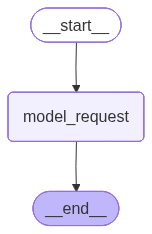
V. How to Run the Code
Execute the script using the following command:
pnpm --filter=ai-notes-langchain run tsx scripts/06-data-validation-with-zod.tsVI. Summary
- Zod constraints (
.min,.regex,.int) are tools to "lock down" data logic. - Always use
.describe()to explain technical rules to the AI in natural language. - Thanks to the
util-langchainsystem, you can easily monitor and export logic diagrams to inspect the validation process.
In the next lesson, we will move on to another crucial topic: Memory — how to help the Agent remember previous exchanges in a conversation!